AFAIK, you fly, as soon as you get out of battery, you land, go with your car, switch battery, then take off and resume mission.
Has anyone had success with a mini 3 pro?
I have a Mini 3 Pro. I created a waypoint mission, loaded the mission, clicked play & selected go to first waypoint. Nothing happened. I tried starting from the air & at altitude.
I’m guessing there is something really simply that I missed.
TIA
Did you receive an error message? Is your controller in “Normal” mode?
I tried again, I missed where it said where it said “NORMAL FLIGHT MODE“
I knew it was an ID10T problem 
The way to do this right now is to use the resume function after changing the battery.
We’ve just pushed the following changes to the Hub:
- [Area Mapping] new ‘Manual’ Capture Mode option for those who wish to control media capture manually
- [Area Mapping] new ‘Photo Capture Mode’ advanced setting: choose between Auto, Interval or Waypoint Action. Auto will choose the best way to capture photos depending on drone model (Interval unless not supported)
- added info tooltips for most waypoint and mapping flight settings
Hello Litchi team. The updated website based Litchi Mission Hub is missing key functionality - the area / transect mapping option. It seems it is only capable of linear or curvilinear flights now and not grid flights that are industry-required for DEMs, orthomosaics, and photogrammetry. Is there something I am missing? ChatGPT is no help with instructing me on what’s up here. Thanks.
3 posts were split to a new topic: Flight Mode Changed message in Litchi app
Hi Litchi team,
First of all, congratulations on the app — it’s an excellent piece of software and extremely powerful in real-world use.
In Orbit mode, the drone does not always point exactly at the POI center during the orbit, so the subject ends up slightly off-center in photos.
I previously asked about this in another forum thread, but I’d like to understand if this is something currently being looked at.
Are there any plans to refine or improve the POI pointing accuracy in Orbit Mode in future updates?
Thanks for all the great work!
Area mapping is already supported. If by grid flight you mean doing several passes, that is something we hope to add in a future update soon.
I have seen a couple of mentions about resume but nothing in detail. Can you resume a mapping mission? What is the intended operation? Resume from last position, waypoint, beginning of leg?
Currently you can resume from any waypoint. When we get to it, we will enable resume from any position.
This new version really look amazing. I have seen just a bug so far (I think it is a bug) that I will be sharing later. Just out of curiosity, any idea when this new version will come out of beta?
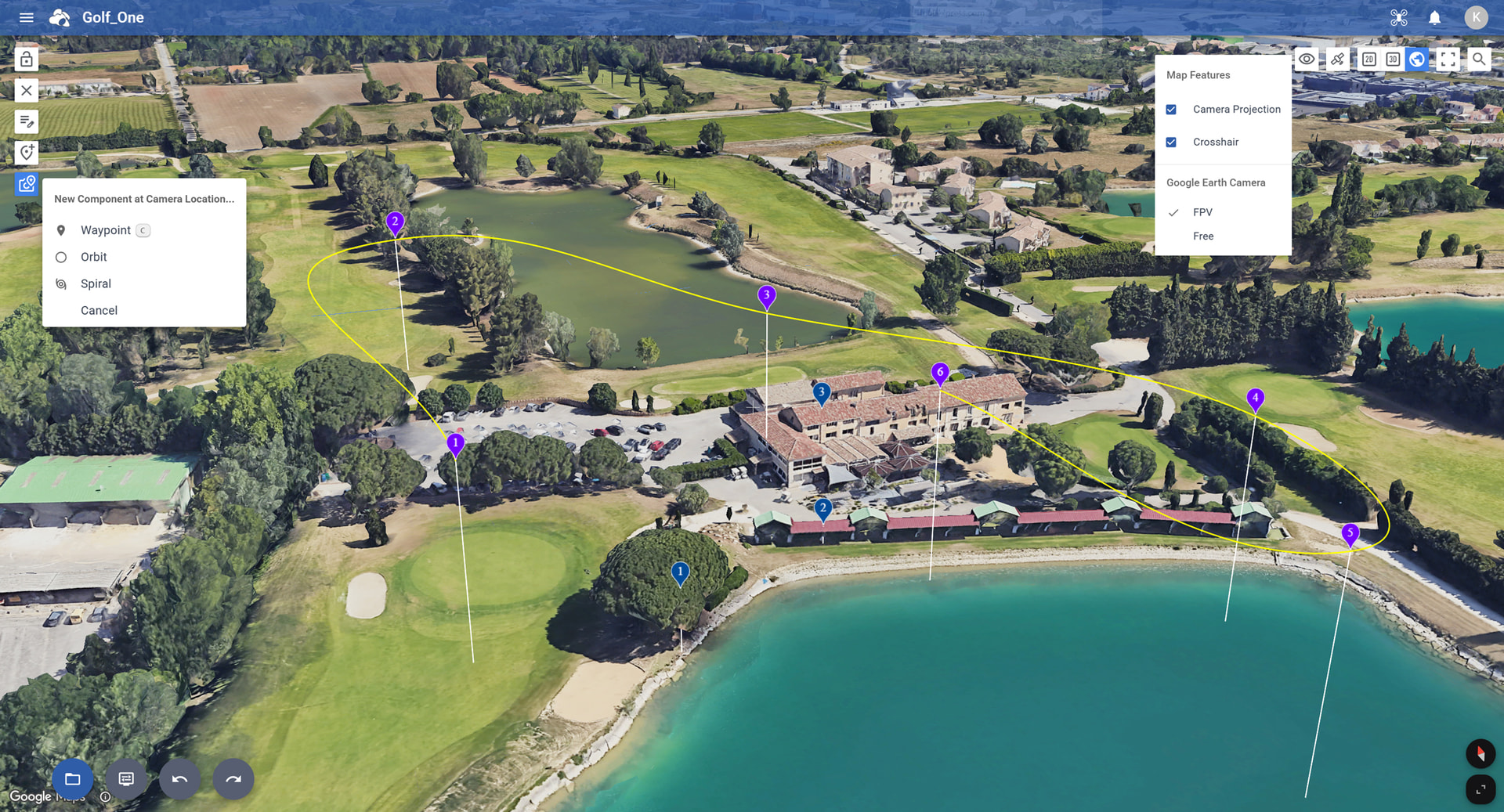
We’ve just pushed the following changes to the Hub:
Google Earth View
- New “Add Component at Camera Location” feature
Adds a Waypoint, Orbit, or Spiral at the exact location of the Google Earth camera. - New “Crosshair” setting
Displays a crosshair to clearly show where the Google Earth camera is pointing. - Smarter POI altitude
When adding a POI, both the ground elevation and the height of buildings or trees are automatically considered to set the correct POI altitude. In addition, moving the take off location (or first waypoint) now automatically recalculates the correct POI altitudes.
DJI Fly KMZ Export
- New export shortcut
Added a DJI Fly shortcut for quick KMZ export. - “Split into Multiple Flights” option
- Each KMZ file contains up to 150 waypoints.
- Helps prevent DJI Fly freezing when flights contain too many waypoints.
- Interval Photo Capture Mode improvements
- When Photo Capture Mode is set to Interval, we’ve significantly reduced the number of required waypoints.
- The Hub also suggests the optimal interval time based on current flight settings.
- (Note: Interval capture must be started manually in DJI Fly.)
Flight Settings
- Easier flight name renaming
You can now rename the flight directly by clicking on its name.
2 Likes
Hi,
Is the Orbit mode centering issue still present, or has it been fixed in a recent update?
The app is getting better and better with every release — great work. The next big step, in my opinion, would be allowing users to combine grid missions and waypoint missions within the same flight plan.
That level of flexibility would make the platform even more powerful and complete.
It is very difficult to perform a search compared to the old version.
Hey folks,
where do I find the new ‘DJI Fly’ shortcut? It used to be export → KMZ but no longer there.
Fantastic software BTW. Newbie here.
[Mini 3 Pro]
Andrew
You have to choose a KMZ compatible drone model.
(The option is not available for Litchi and Litchi Pilot compatible drones)
1 Like
Thanks, found it. The drone selection drop-down list has changed and I didn’t realise there is now a ‘DJI Fly’ section.
Thanks.