I’ve been trying this for days and I’m really pis*ed! When I export a kml file it goes straight to Google Earth. What am I doing wrong? Litchi Bridge is installed and running (?) I’d be eternally grateful if someone can help me figure this out.
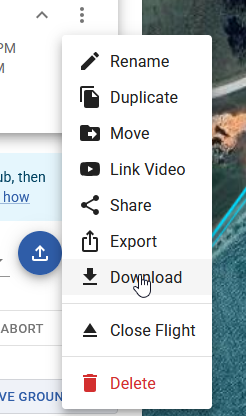
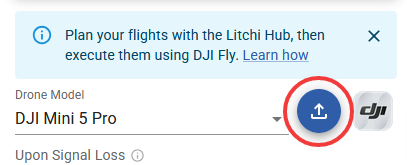
Are you using the export function which is listed after clicking on the 3 dots at top of plan. If you’re exporting this way you need to select DJI Fly KMZ, not KML. Or did you use the blue download button next to the drone model which uses the Litchi bridge. Depending on how you want to export it they are different ways. Also it will be a DJI KMZ file, not a Kml. Maybe that will help.
You are selecting the wrong export function to export using Litchi Hub Bridge.
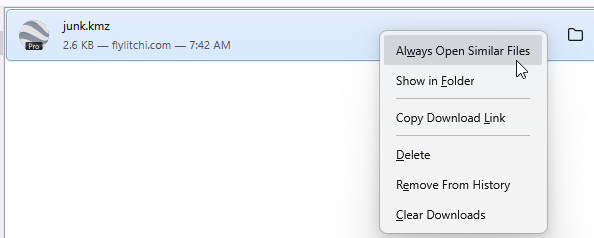
Your browser is set up to automatically launch Google Earth Pro for KMZ files.
The “Export” function you are selecting (shown below) is for exporting a KMZ file to your computer. Do not use this function if you want to export directly to a DJI Fly drone.
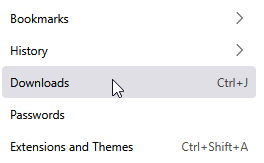
Furthermore, the fact that Google Earth Pro is opening when you export a KMZ file using the first method is because your browser is configured to do that. My suggestion is to disable that. Browser configuration is dependent on which browser you are using. For example, with Firefox you would select the hamburger menu (three horizontal lines in the upper right) and select “Downloads”:
The KMZ file upload feature on the Mini 5 Pro works great! Now you can even split files (in the amount you think is appropriate, also based on your battery life). This is an incredible feature, well done, and I want to compliment the staff because everything works great. Thank you.