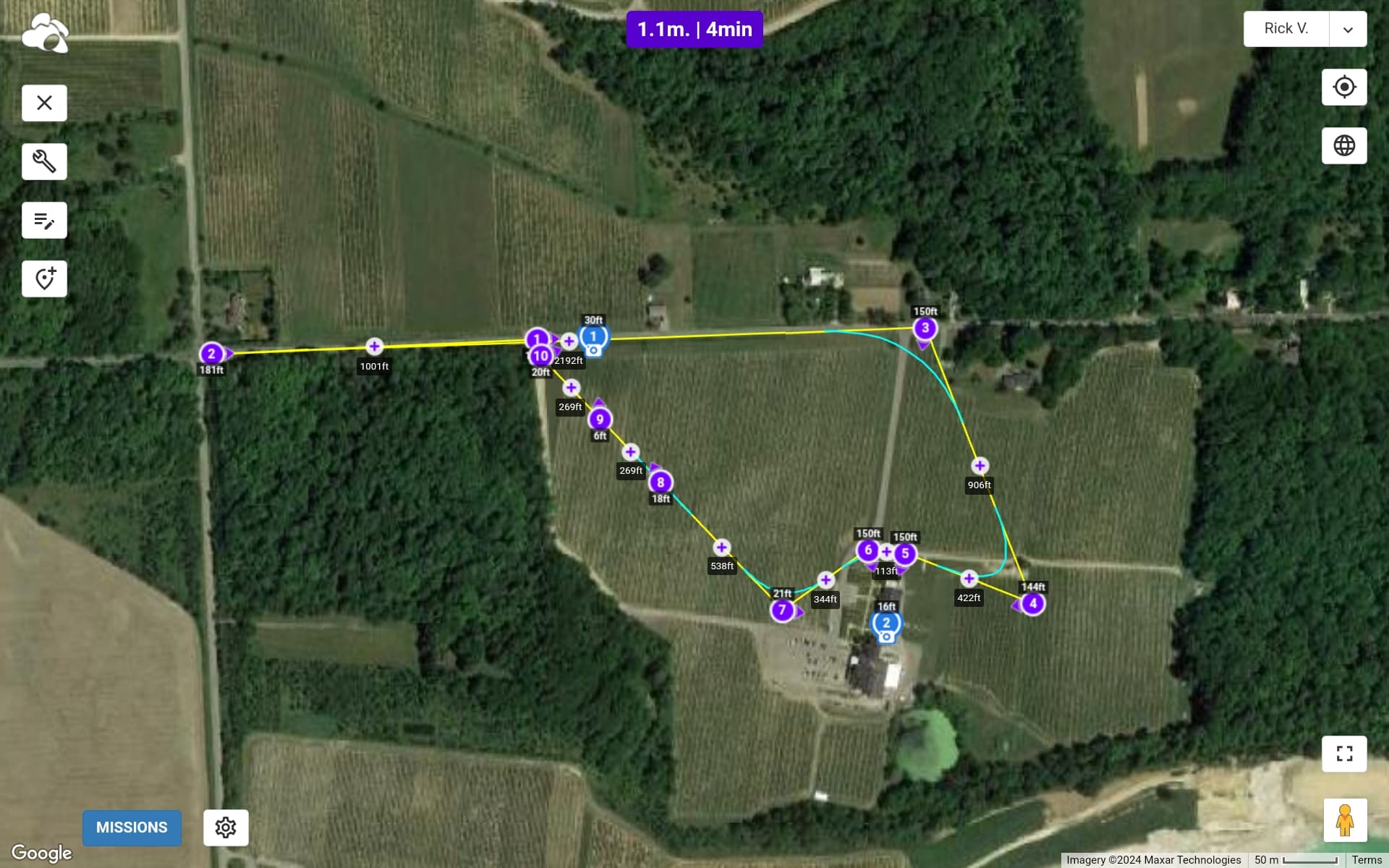
The drone will fly according to the heights used in the elevation model. The elevation model is only an estimate. I don’t know how accurate the elevation model will be around a glacier or how much a glacier’s height can change over time. If you will be able to keep your drone within line-of-sight during the mission, you can always cancel if it becomes too close to the ground. I would fly the first mission higher above ground to be safe and then adjust for subsequent flights.
Curved turns are generally used during missions designed to capture video. Straight line paths are generally used in missions designed to capture photos. When using curved turns, the path of the drone normally does not intersect the waypoints.
Ideally the Litchi forum. After selling the Mini 2 and purchasing the Mini 3 Pro, I have not been able to use the Waypoints for more than a year. Now finally with the Beta, learned a lot here on the forum, also with the KLM and VLM for Earth. Thank you to everyone who helped with this.
Hi James,
I’m doing a video for a winery, and I want to fly low over the vines, like 20ft. Waypoint 9 says 6ft. Altitude is set at 20ft, and Above Ground box is checked. Can you help ease my mind before I send Amelia on a suicide mission!
Thanks for your help
Rick