Phantom 3 Standard. Using Beta I create an Area map which tells me it is going to take 44 photos.
When I fly the mission, it takes no photos unless I manually start.
P3S is a fixed focus camera so no option about AFC.
When I look on the ‘old’ LHub, is shows there is a WP at each turn, but none of them seem to start an interval timer, and I can’t find out how to add this either in the old or the Beta Hub.
The turns do not look like WPs on the Beta Hub? So I can’t click on them to view or adjust properties except on the old Hub (which doesn’t have an option to start interval timer.)
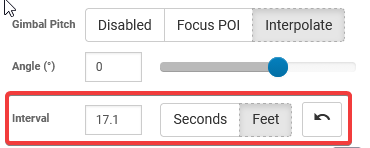
However they do show as WPs on the App, and have an interval timer correctly set at 7.7m (not as an action, but above Action 1 . . . and the Mission setting is interval disabled??
Have I confused my file by opening it on the old Hub, which might have removed things it doesn’t understand (like action = start interval timer)?
Are you sure there is not an interval set? There should be photo intervals configured at each waypoint that starts across the mapping area. In the old hub, you can see and set the interval photos here:
I have a Phantom 3 Standard and mine also ignores the defined interval photo captures. I don’t know the history of interval photos on the Phantom 3 Standard so I can’t tell you if it ever worked or if it is a bug that has recently appeared.
Yes I can see the interval defined correctly at each WP, but like yours, my P3S just ignores them . . .since I created the area mapping through the Beta Hub, I hope one of the developers can find out whether it is a ‘beta-bug’. Only recent, as the ability to create polygon areas has only just appeared since the Beta, as far as I’m aware.