Hi,
I have created a mission in Litchi hub. I have tried to use the Hub Bridge to transfer the files to my RC 2 Pro and that failed to connect. So, I copied the file to a MicroSD and inserted that into my controller. I use the android files app but I can’t find any kmz files on the internal storage.
created way point mission in hub
Exported kmz file to HD
copied file to mSD
placed mSD in RC 2 Pro controller
created a dummy mission in DJI fly and saved it
Started android file manager on controller
Went to Internal Storage, Android… but there is no Data folder.
Went back into DJI Fly and confirmed that I have 2 saved mission on the controller
Back to file manger, but still no Data folder under Internal Storage, Android. Only a Media folder and it is empty.
I used file manager search for Data and only come up with a could of database files. No Data folder.
Pulled my hair out and am posting on the Litchi forum, help appreciated.
Is anyone experienced with the RC PRO 2 controller? and this problem?
That would suggest that you might be using a USB-C cable that only transmits power. Are you sure that you are using a USB-C data cable? Also, sorry, I have to ask, is the DJI RC Pro 2 turned on when you plug it in to your computer?
Those cable should be OK then. You mentioned copying the KMZ file to an microSD card. I have instructions for the DJI RC here. Look through the section titled: Alternative Android Method Using MicroSD Card to see if that helps at all.
Ideally, you should be able to browse the RC Pro 2 controller from your computer. Maybe someone who has used that controller will respond.
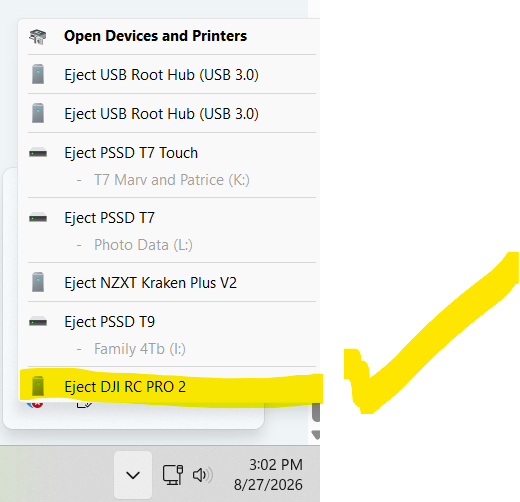
Thanks, that interesting, and did lead me to discover that the RC Pro 2 shows up… but only in the USB control icon, not in folder explorer. Hum. more to research.
No Joy. But I have identified it as a computer problem. I tried hooking up my RC Pro and it had the same problem, so I hooked the controller up to my laptop and it worked perfectly. So now I need to go down that path to figure out why my desktop won’t communicate with the controller.
Thank you for your help and suggestions. If I find a solution, other than plan them on my desktop and upload them from my laptop :-(, I will post it here.
 Yes the controller is powered on.