This may already be out there but didn’t anything.
I just found out, after multiple R2 controller crashes, that my DJI AIR3S is limited to 199 consecutive waypoints. Which limits what mapping missions I can accept. Is there a software out there where you can upload multiple chunks of 199 or 99 waypoints ( seen that number out there) into a single consecutive group of waypoint pics? Thanks much for any feedback!
1 Like
Welcome to the forum.
There is no hard limit of the number of waypoints in a DJI Fly mission. I work with people who fly DJI Fly missions made up of hundreds of waypoints. I think the largest I have heard of successfully working is around 800 waypoints. There may be a memory limit based on mission data size which would include things like actions performed at each waypoint. However, it is unclear how to measure that.
It is not clear to me what you are asking. On the one hand, you mention hitting some sort of limit using your RC2 (?) controller. On the other hand, you are asking how to combine multiple chunks of 199 waypoints into one mission. Wouldn’t that exacerbate the mission size problem you are trying to avoid?
Since Litchi missions can be stored as CSV data, it would be easy to manually combine several Litchi CSV files into one. However, it is unclear if that is what you are asking.
Thank you for the reply. I spoke with DJI tech. Unfortunately for me, the AIR 3S has a hard limit of 199 waypoints. He said it was designed with cinematography in mind, not mapping and surveying. Most older and enterprise DJI drones do not have this limit. But some of the newer consumer drones do.
If you are mapping or surveying relatively flat terrain, you dont need that many waypoints.
Using a ‘lawn mower’ style of mission, you can cover a LOT of property with 50 or less waypoints.
If your terrain is flat, you only need waypoints at the ends of corridors.
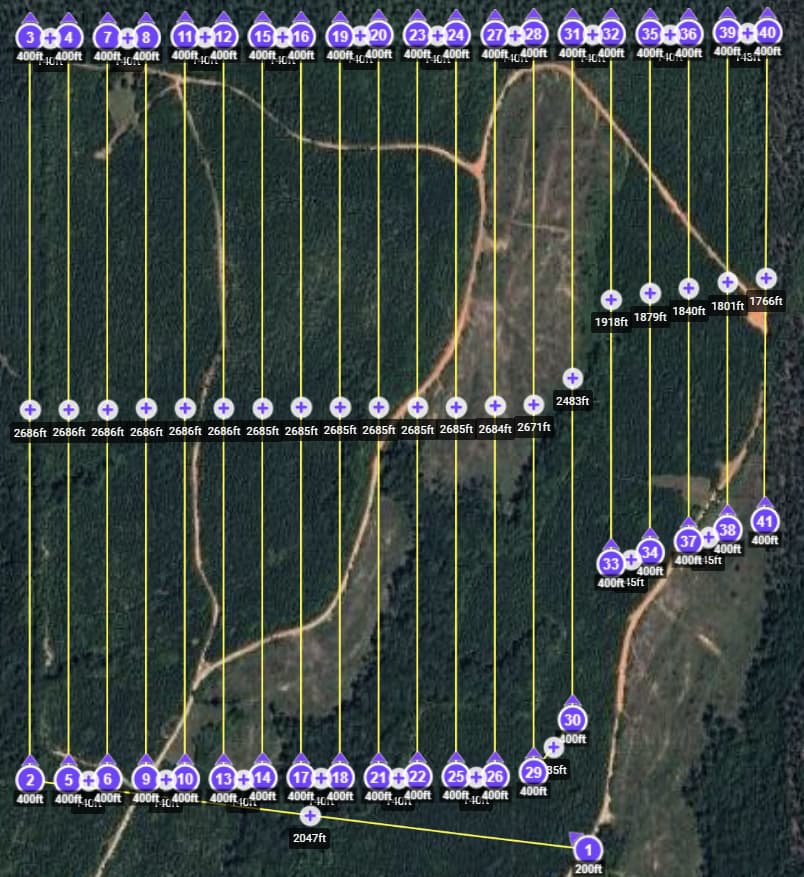
This mission covered over 120 acres (almost 50 hectares) with 41 waypoints. I had to stop and change batteries, then re-start and the previously covered waypoint.
Set the photo interval to capture images by distance or time.
1 Like
Got it! I am a newbie and was just beginning to grasp that. I thought I needed a waypoint for every shot. Duh! You just clarified and confirmed!
Thanks so much for your help and input!
Much appreciated Wes!!
PS: If there is a way to make something more complex than necessary, I am that guy! haha
A couple things to be aware of. Depending on which app you use to convert to a DJI waypoints plan then to a DJI KMZ file it can be different. I know that when using either the Map Pilot Pro or Dronelink app it will place many waypoints along the path in order for it to have a straight path. The DJI Fly waypoints uses Bézier curves and cannot be set to a straight path. If you remove all the waypoints along each leg except for waypoint at each end you will see the path goes to a curved path and goes all wonky.
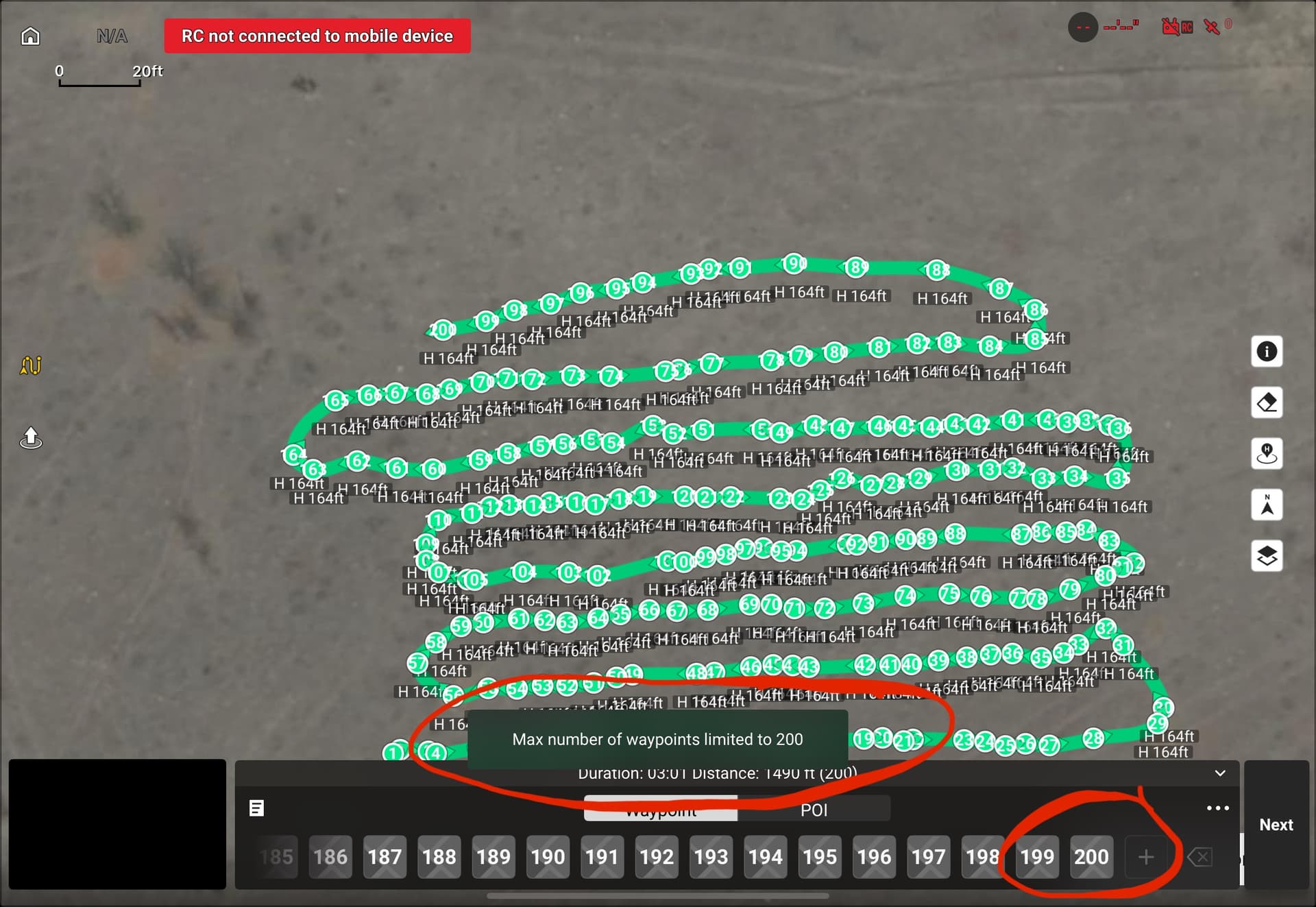
I know when specifically using the Map Pilot Pro app with larger maps it will split up the mapping mission into a couple or several smaller missions automatically with 200 waypoints each. It does explain this in the Map Pilot Pro help articles. However, when using the Dronelink app which is what I use it will work with larger maps with hundreds of waypoints all in one mission. So there can be a difference on how it’s converted depending on which app you use. If you search for an article on how to use the DJI Waypoints it does say 200 max allowed. If you go into the DJI Fly app and create a large waypoint path mission it will not allow you to go above 200. So there are many things which may affect the use of DJI Waypoints. Just some info to be aware of. Enjoy.
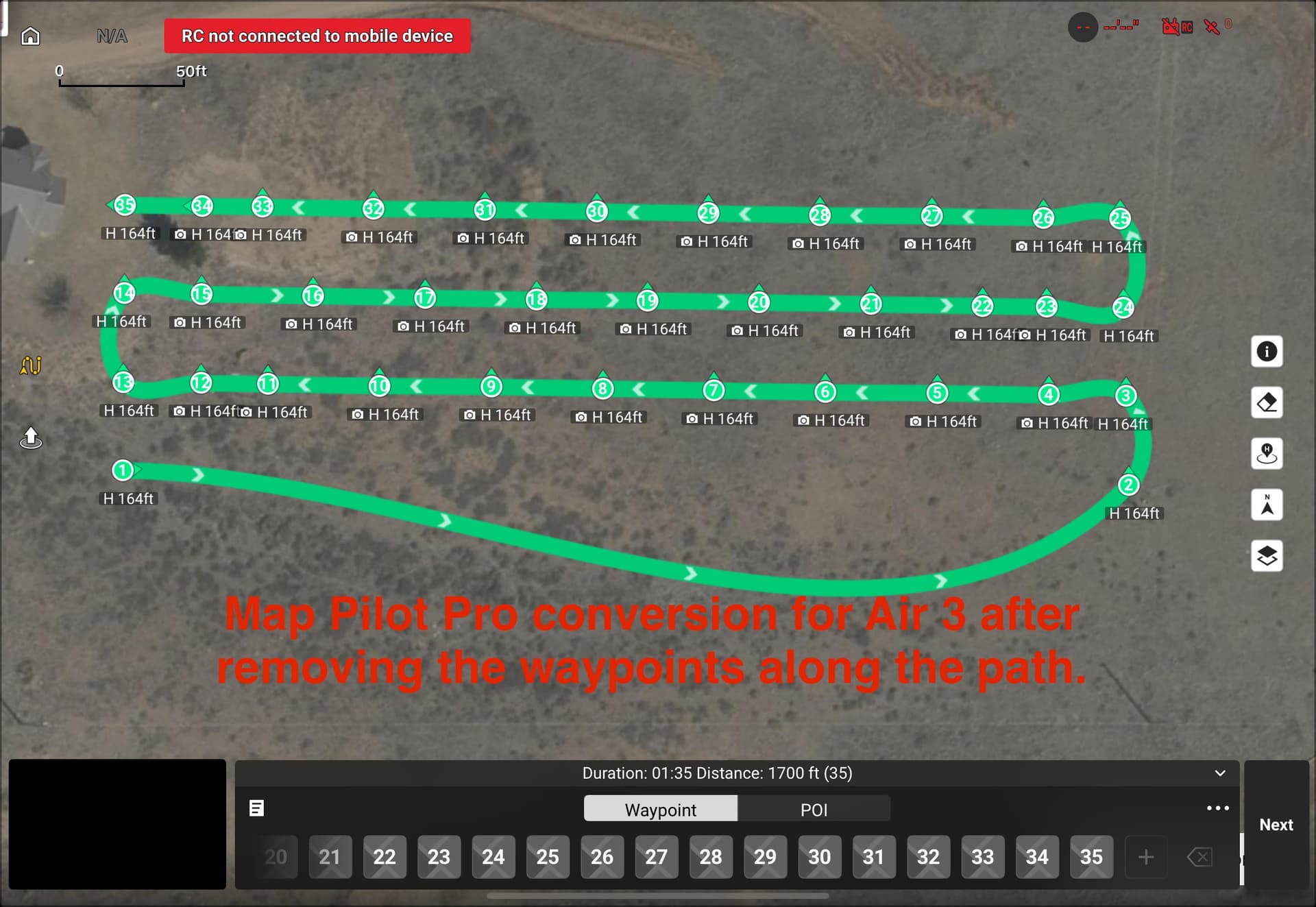
DJI Fly uses a Centripetal Catmull-Rom spline. Details can be seen here:
While the DJI Fly app does not let you select between curved turns and straight-line missions, the WPML language does support straight-line missions. My converter will convert a straight-line Litchi mission into a straight-line DJI mission that can be successfully flown using a DJI consumer drone.
I have seen that too. However, I work with people who regularly fly missions with 200 - 500 waypoints using DJI Fly. Perhaps there is a limitation when manually selecting waypoints. However a large Litchi mission with well over 200 waypoints can be converted and flown using DJI Fly.
Wow! Thanks so much for taking time help me with this!
I’ve been using “ancient.land” for the waypoint grid, adjusting to keep waypoints below 200. Then uploading to Litchi for the grid detail config. E.g., how many seconds between shots, alt, speed, curve, gimbal, action, etc. I will certainly try MapPilotPro.
Also, I have another ticket open with DJI. I flew a mission this morning and at waypoint 156 (187 total) the RC2 froze up again. Only this time the AIR3S didn’t come to a hover out there in space and this time kept flying the mission. So I didn’t reboot the RC2 to make the drone RTH. I waited until the drone finished flying the mission and return. It came to a 4’ hover over the landing zone but wouldn’t land. the RC2 was frozen and nothing worked, controls, RTH, nothing. Rebooted the box and was able to land the drone. It completed the 187 shots successfully! Spoke with the same DJI tech today and they escalated. Also got an email from I guess tier-2 support. They believe it’s now the RC2 that is the issue. Its been kinda nuts these last few weeks. 199 waypoint limitation and the RC2 having fits at the same time.. Weird.
Thanks again Mike!
Thanks Sam,
You guys are totally helpful.
I am definitely over doing the Waypoints.
What did you use for path width, shot spacing, and altitude for that mission?
Appreciated!
I use this site as a starting point.
Select the drone model (some newer ones won’t be listed), draw the polygon, select an altitude and go ftom there.
You can export the CSV file, then import it into Litchi for fine tuning.
I typically fly at 300 to 400 ft altitude, depending on the area to be covered and the level of detail desired.
Understood Wes. I did state that different apps may work differently. I have used you Litchi Utilities which are great and I am aware of how yours works and i have actually supported a couple times. My whole point was apps work differently. The 200 which I mentioned was when specifically regarding when creating a plan n the DJI Fly app. I’m guessing when using Map Pilot Pro they stick to the max 200 waypoints which is why it breaks up larger maps that exceed 200. Not sure why they do it that way but that’s life in the technology age.
That Map Pilot Pro plan is a basic normal pattern map set to their default overlap and the photos are automatically captured at each waypoint. I don’t have a subscription with them so the free version is very limited on what you can do. You can download the app for free to see how it may work for you. The one great feature is when you export the KMZ file it automatically puts the plan into the DJI Waypoints plans without needing to create any dummy plan first or changing the plans name to the long DJI mission name. A couple quick clicks and it’s done. You may want to try it.
Hey folks,
Thanks again for all the support!
Finally spoke with someone at DJI who clarified why the RC2 froze again around waypoint 156\186 (note: performed a second backup grid (per Sam_G recommendation) and ended up@105 waypoints no issues. DJI clarifed the 200 waypoint limitation is only a guideline. It depends how heavily the waypoints are weighted. Meaning number of instructions. I had altitude with terrain, speed, gimbal, turns, path follow, and action (take pic). I guess that’s considered heavily weighted. Thanks all!
That makes sense. If you dissect a DJI KMZ file and look at the “waylines.wpml” file, you will see that the language is rather verbose. There are a set number of tags (key/value pairs) for any waypoint. That is relatively constant. However, once you start adding actions to a waypoint, the file can more than double in size.
The largest (depending on how you measure “large”) waypoint mission I know has been flown contained 800+ waypoints. That was with no camera actions and flown with an RC Pro. The RC 2 probably has less memory. Initial reports indicate the limit is around 300 waypoints for the RC 2. But really, it depends on file size due to actions.
You ended up solving my problem. I tried all the available tools and even made a script in Windows to adjust things. I noticed the flights looked great when I created them manually with waypoints, but that took away a lot of the quality. With Ancient, I was able to set them up by waypoint in Litchi and it worked perfectly! Thanks for the tip—I think Litchi might release an update for this in the future.
1 Like