The Matrice 3D/3DT is not mentioned anywhere. Is it compatible/supported ? It uses the RC PRO controller. The drone is somewhere between the M3E and the M30 I suppose.
We don’t have one and as such cannot test it. You are welcome to try and give us feedback. Officially it is not listed as compatible with the DJI SDK but it could be treated as a Mavic 3 or 3T which are compatible.
Anything dock related won’t be supported.
OK. I tried it today (standby mode only). It works.
Litchi Pilot talks to the Matrice/M3D and displays video. Basic functions seem OK except for camera zoom. The camera is on zoom 1.0 and does not change either by touch screen or the right-side control wheel nor the C2 button. The gimbal does respond to the left wheel, although no angle is displayed. Focus and EV work. Still and video recording work.
Litchi Pilot found a waypoint mission I had on file (although I did not try to fly today). I don’t know what commands the aircraft will respond to while running the waypoint mission. It displays the mission outline, but you cannot edit - attempt to edit results in a white screen.
I note that, in DJI Pilot, there is an aircraft selection menu where the choices are M3D and the M3 Enterprise series, so there is something different about the M3D.
Just to be clear (I am sure you know) the motivation to use Litchi is to be able to set up detailed missions without having to subscribe to the DJI FlightHub $oftware for mission planning.
For mapping, what is missing is the ability to trun on the RTK feature and use the mechanical shutter. Since one of the reasons to run a waypoint mission is mapping, having RTK working is a requirement.
Ken
I note that there is an SDK for the Matrice 4D. It might be interesting to have a look at that.
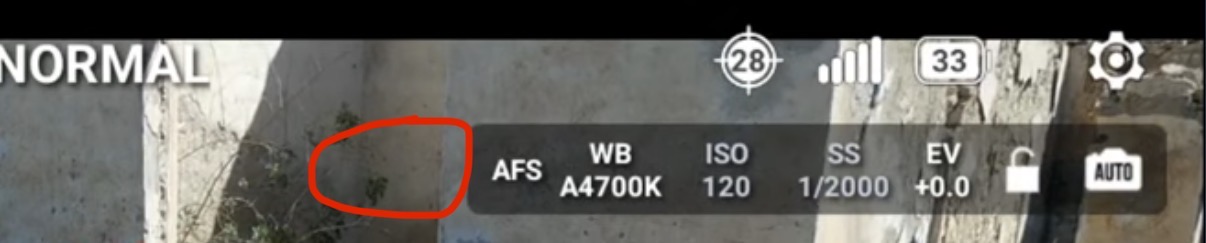
For the camera zoom, did you switch lens before trying to zoom? You should be able to switch camera lens using the button located on the left of the exposure information (ISO etc). Gimbal pitch angle should be displayed at the bottom left corner below the flight altitude
You can simulate a waypoint flight even when grounded. Long press on the top bar (middle) enables the simulator (requires drone connection).
To edit waypoint/mapping flights you must use the Hub and currently internet is required for that. If you get a white screen it’s probably because you are offline. The edit/pen button opens the Hub within Litchi Pilot.
RTK support is in the works
I found the gimbal angle - thanks.
But there is no button left of the exposure “bar”.
In waypoint mode, the edit pen just gives a blank screen - it was white yesterday and today it’s black. But it’s blank in any case.
Good news on the RTK support. I also have an M3E with the RTK module.
Ken
If you do not see a button where I circled in red that shows the currently selected camera lens (LEFT/DEFAULT/Zoom/IR) then most likely this is an issue with the DJI SDK and lack of proper M3D support. M4D is officially supported so should not have that issue.
Are you connected to internet on your rc pro and able to load https://hub.flylitchi.com in the built in web browser?