Here is something I’ve been seeing. Waypoint Heading values with LOCKED setting are not being executed correctly. I have a Waypoint mission with most Waypoint settings getting ignored when photos are taken. It seems the actual Heading is being read from the last waypoint rather than the current Waypoint specified. Here is a photo showing Waypoint 7 with Locked Heading set to 87’, but in actuality, the heading of the drone (see photo taken) was completely 180’ reversed. Is the Heading value of the last waypoint somehow being used in the current waypoint rather the Waypoint specified Heading? See the screenshots for Waypoint 7 to see the problem. Drone is DJI Mini 3 Pro. (PS - same issue for the Gimbal pitch angle seems to use the last waypoint value instead of the current one).
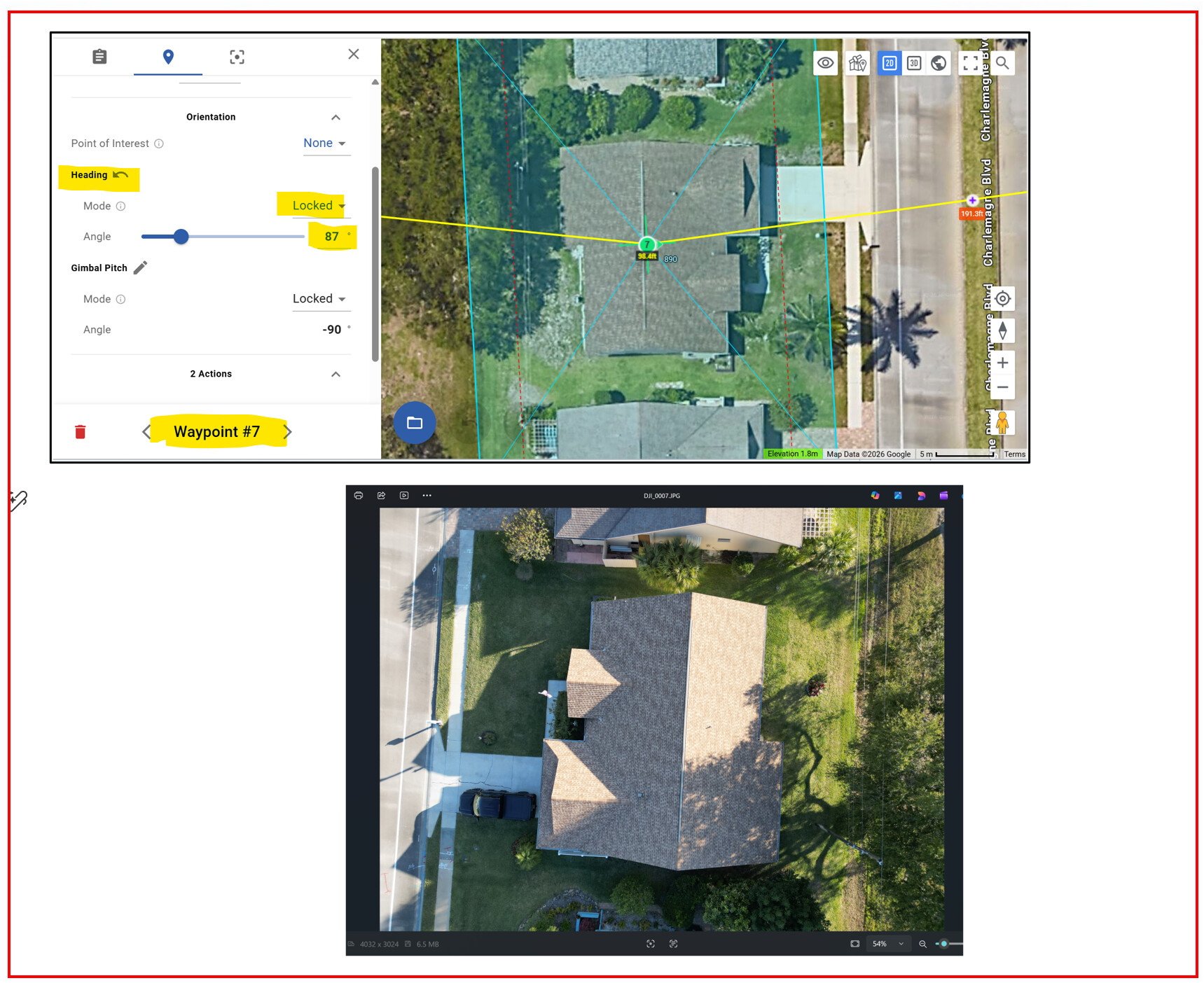
The heading mode applies from one waypoint to the next. In your case, it will be locked to 87 when travelling from WP7 to WP8.
If you are trying to take photos at a specific heading, use the Rotate Drone waypoint action before using the Take Photo.
ok thanks. good to understand.