Hello
Will the KML-import feature ‘Treat views as waypoints’ be added the the new Litchi Hub?
Planning a mission in Google Earth by setting these ‘views/waypoints’ is a big timesaver.
Kind regards
SB.
Hello
Will the KML-import feature ‘Treat views as waypoints’ be added the the new Litchi Hub?
Planning a mission in Google Earth by setting these ‘views/waypoints’ is a big timesaver.
Kind regards
SB.
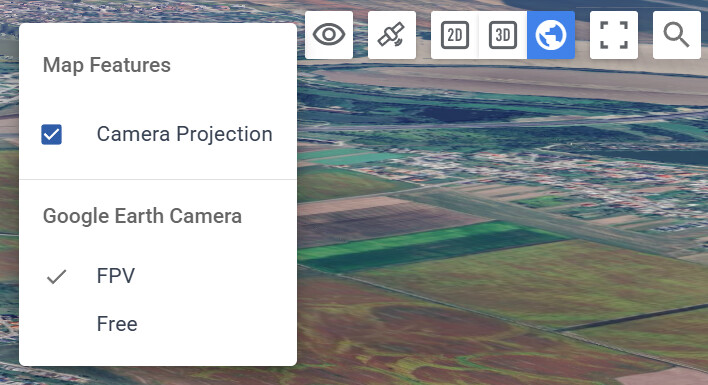
Have you tried using the google earth view in the Hub? This should provide you with similar functionality. You can place waypoints in the google earth view and adjust the camera angle easily by setting the Google Earth Camera setting to ‘FPV mode’
The workflow using Google Earth works (at this time) slightly better.
In Google Earth, I first set my drone’s FOV.
Then, I set the exact view I want and when a waypoint is added, this view will replicate exactly when the KML file is imported using the ‘treat views as waypoints.
In the new Litchi Hub, I can set waypoints using the Google Earth view but the fine-tuning of each view is a lot more hassle. In the settings for each waypoint, I have to change to gimbal tilt, drone height etc…
Also, when I change the model of the drone, the ‘drone-specific-POV’ doesn’t change in the actual (FPV) view, so there’s also a bit more guesswork involved.
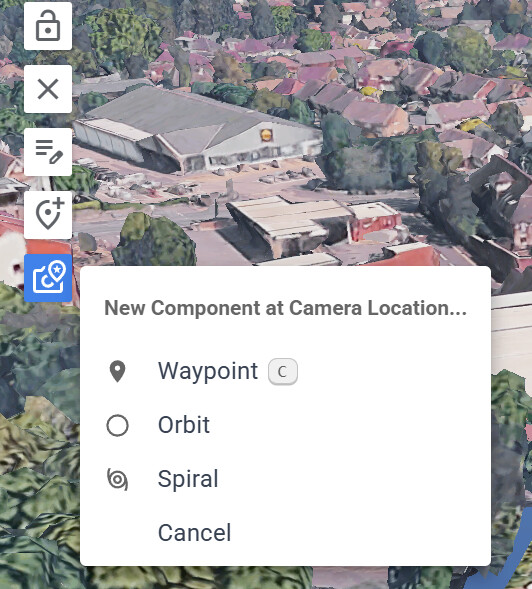
We’ve made it possible now to add a Waypoint/Orbit/Spiral at the location of the google earth camera in the new Hub. Note that we recommend setting the Path Mode to Straight or Smooth Curves (not Curved Turns) for best results.
Regarding the Google Earth FOV, it’s not something we have a solution for within the Litchi Hub at this point. However, on most monitors in full screen, the default FOV should not be too far off.
Great!!
Just tried it and the ”New component at Camera Location…” is a killer feature 
Mission planning got even simpler now.
Keep up the splendid work!