I have perfected waypoint locations and altitudes for a route and wish to copy (duplicate) and rename the route so I can change heading and gimbal pitch (to adjust for sunrise vs. sunset and a different horizon placement in the frame) in the new route. What is the most expedient way to do this in the new Litchi Hub? In the legacy Litchi Mission Hub, I would open the original route, then click on the Mission button and Save to a new name. I can’t quite figure this out in the new Litchi Hub, yet.
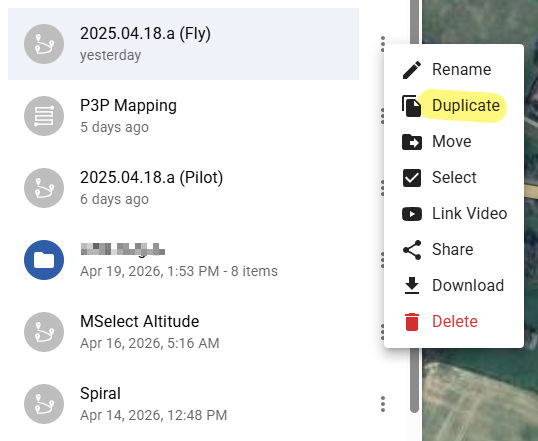
Ouch! Freshman oversight. Thank you for the quick reply. I was so intent on looking for a Copy/Save selection that I completely overlooked the obvious. It was only when I was formulating my question that I adjusted my terminology to mean “duplicate”, but I never revisited the menu with this expanded perspective before posting. Thanks again.