Everything suggests that the drone doesn’t know the height of your hills, and neither does the litchi. Altitude is always calculated from the takeoff point. Litchi sends commands to the drone at what height to take off relative to the takeoff point.
Just a suggestion:
It’s all very well explained in the Online User Guide under the Tabs ‘Waypoint’ and ‘Mission Hub’.
1 Like
This AGL feature is useless! Lost my drone and sensor to a tree.
in pictures below you see the same area with two different flight missions the one set to 25m and the second 15m, in the first the height keeps going above 25m but in the other the heights go below 10 even.
I dont understand why the hieghts are relative to the take off point if your are using online elevation data, each point should be considered and calculated individually.
When I flew the grid at 25m my data was a mess because of the varying heights
and in the second grid I was sure the drone would clear the trees not noticing the heights dipping as low as 8m!
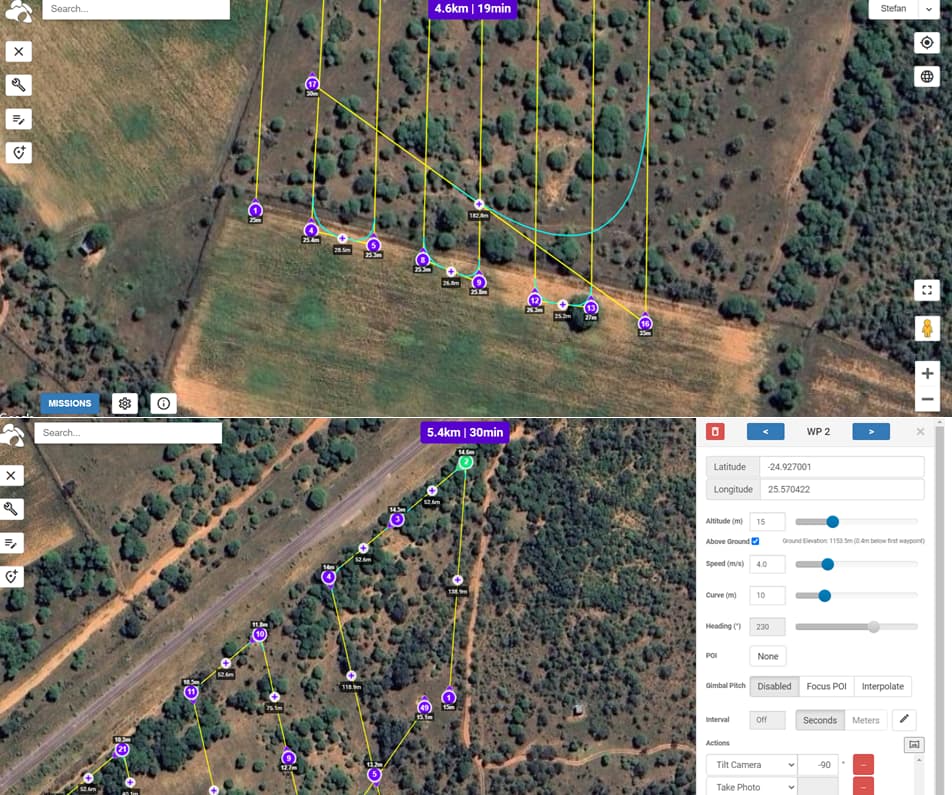
No it’s not.
The drone calculates/knows it’s height by measuring barometric pressure and uses the Home Point as reference.
They are.
Here are some usefull links:
I understand and have read this help section over and over but still dont understand what to do to get the drone to maintain consistent ground clearance for obstacle avoidance and my data quality.
I assumed that it adds the flight height to the online elevation data but why in the second example is it flying lower.
The displayed altitudes are relative to the Home Point after ground elevation compensation. Meaning the grond elevation at the WP with 8m is 15-8=7m below the Home Point and the drone still flies 15m above the ground.
Also, when the ground elevation of the Home Point differs from the ground elevation at WP1, your whole mission will differ with the same amount.
Your Home Point and WP1 should always be at the same ground elevation.
I don’t understand what you mean by that.
Many find it very useful.
In the Mission Hub, the height of each waypoint is calculated using elevation data. Then the waypoints heights are offset by the difference between the ground elevation at waypoint 1 and the ground elevation under every other waypoint. The drone can only ever calculate its height relative to the take-off location. The drone cannot measure its height above ground. So, it must depend on the heights calculated in the Missoin Hub and it assumes that the ground elevation at the take-off location is the same as the ground elevation under waypoint 1.
TriBar has already provided good details. Another thing to keep in mind is that the mission heights are only calculated at the location of the waypoints. Your first image shows some mission paths that may traverse over ground of varying heights. If the ground has many variations, you may need to add more waypoints to ensure the drone maintains the desired height above ground throughout the mission.
1 Like
So China, i battled with this long donkey. The best way i figured it out was to create the “mission plan” then export as a KML file and import that to google earth. The path on google earth shows up as a yellow line with the individual points but if you rotate to a 3D side view it actually shows the heights in 3D and that was where i was then happy and confident and it worked.
Much simplet than tryong to get your head around all the take off points and altitudes.
Just see it visually.
Or download the Virtual Litchi Mission desktop program. It is an easier way to set-up a Litchi mission, then quickly export it to Google Earth Pro and see it in 3D.
While you can do that to see the mission in 3D, the overall height of the mission is still dependent on the ground elevation at your take-off location and how that relates to the waypoint heights.