I’ve created and flown several missions without any issues using the Hub, DJI Fly, and my Mavic 3 by exporting the KMZ file. Generally, the altitudes set in the Hub are relative to the ground, not the home point.
I ran into problems during a photo mission.
The altitude for all waypoints was set to 50m. The altitude displayed at each waypoint obviously varied due to changes in terrain elevation.
While the hub displays that number, the Fly app does not.
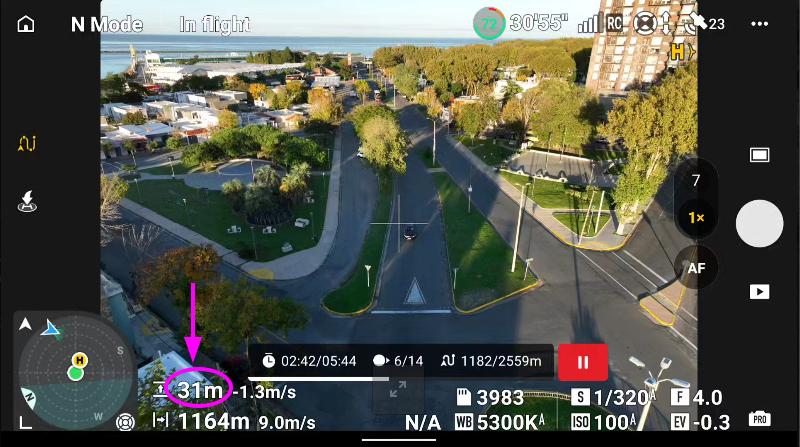
So, at points where the hub showed 63m, the Fly app displayed an altitude of 50m during the flight.
It’s as if “Above Ground” wasn’t taken into account and “Above Takeoff” was used instead.
At a certain point during the mission, the drone began to descend, and when it dropped to 29m, I suspended the mission.
I’ve checked the DJI forum, but as usual, the answers are very basic…
I don’t know what might have happened here, but I suspect that something in the KMZ file wasn’t interpreted correctly (I can share the file, or the LCHZ).
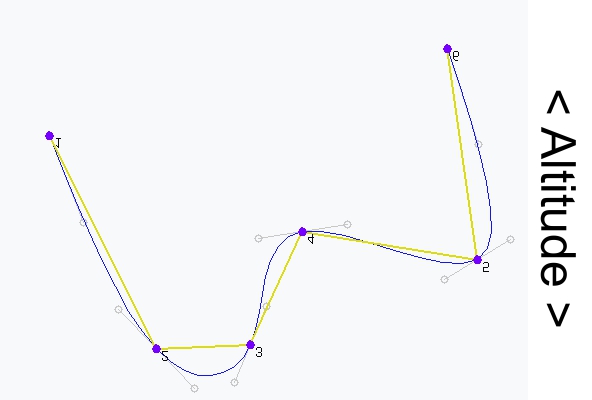
It’s the result of the way a path with smooth curves is created in DJI Fly. The flight path can, depending on the 3D position of neighboring waypoints, descent below the height of the waypoint with the lowest altitude, and vice versa.
Both points are correct but are unrelated to the issue at hand.
If the descent from one waypoint to another were from 50 m to 10 m, I understand that, due to the Bézier curve, Fly’s altitude would be 0 or even negative at some point.
That is not the case, as I have pointed out; all are between approximately 50 and 60 m.
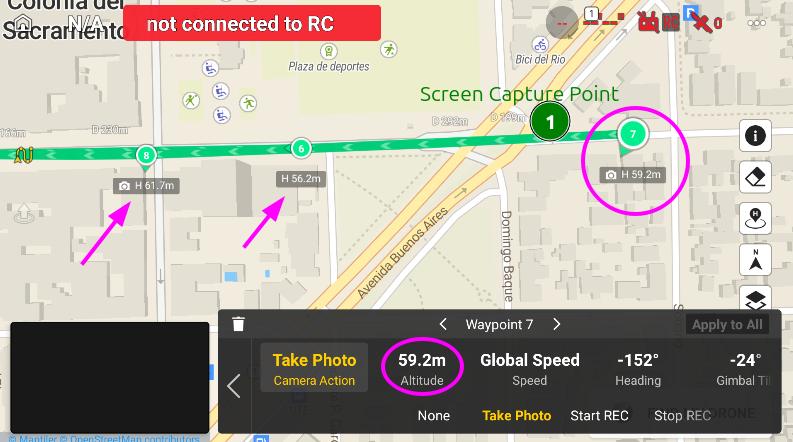
In Fly
WP6 H=56.2 m
WP7 H=59.2m
WP8 H=61.7m
It doesn’t make sense to descend that low, even if the distance between waypoints is somewhat “long.”
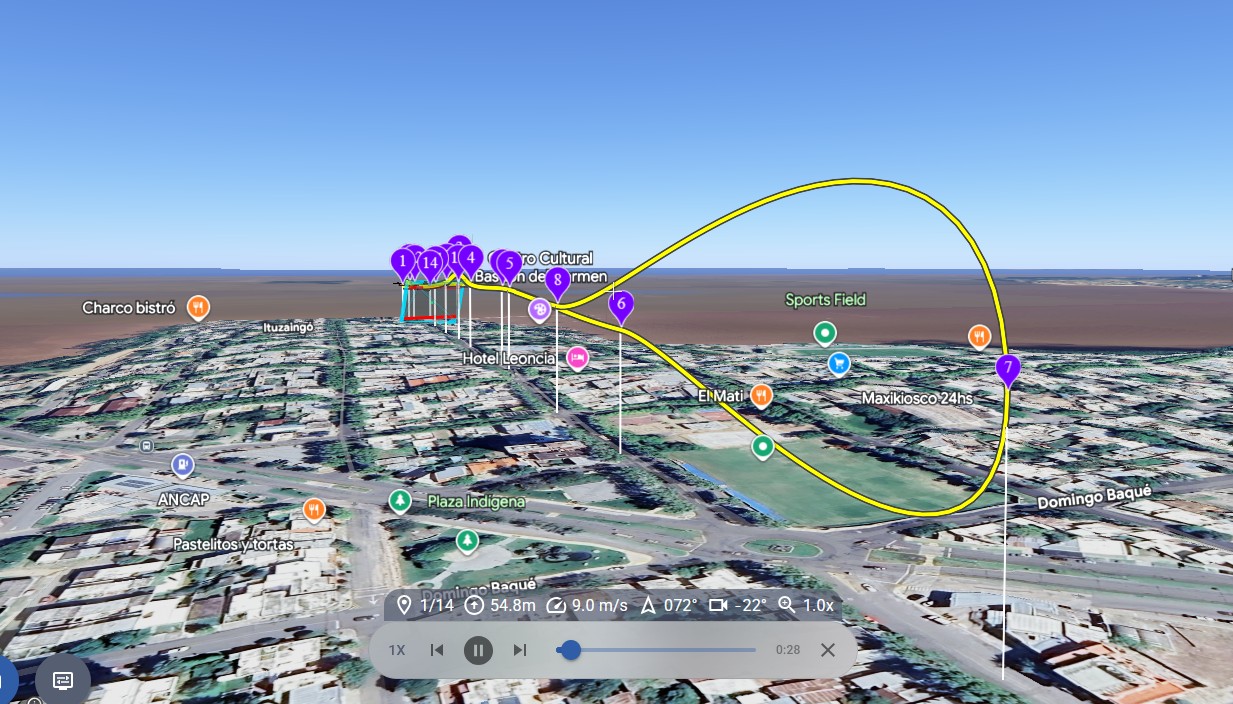
You can see this in the screenshot posted on the DJI forum I mentioned.
How altitude is measured isn’t relevant here.
The hub displays terrain altitudes (ASL). Therefore, 50m “Above Ground” altitude in the hub becomes 59m “Above Takeoff” (for example) in DJI Fly (and this is how the hub displays it at each WP).
That’s fine, but during the flight, Fly showed me 50m even though the WP was marked as 59m.
The 59m above takeoff setting was not followed.
“A drone is not aware of its altitude above ground level because it uses barometric pressure changes relative to the takeoff point.”
Of course. It should fly 59m above the takeoff point, not 50.
That is not the expected behavior. Would you be willing to share your Litchi flight plan? I will probably eventually ask for the flight log too, but the Litchi waypoint flight plan would be the first thing I would like to look at.
I have had a look at your mission. For now, I am only looking at waypoints 1, 2, and 3. The photo you included says “waypoint2”. However, comparing it to a map, it looks like it was taken between waypoints 6 and 7 facing southwest.
The height data that is written to a KMZ file is always height above take-off. These values are displayed in Litchi’s Mission Hub on each waypoint. Here is a list of the heights from the converted KMZ data:
As you can see, they match what is displayed in the Hub perfectly.
ATO heights for waypoints 1, 2, and 3 are: 50, 65.2, and 75.1 with waypoints 2 and 3 being much closer to each other than waypoints 1 and 2. This means that between waypoints 1 and 2, the flight path will have a slightly lower height than at either waypoints 1 or 2. However, my guess would be that it would only be a couple meters lower. My suggestion would be to add an additional waypoint midway between 1 and 2 just to maintain your desired height.
According to Google Earth, the elevation under waypoint 2 is about 15m higher than the ground at waypoint 1. This corresponds well with what is displayed in Litchi.
Since I do not see a major problem with your Litchi Mission, I would like to see the flight log for this flight. I can then plot both the Litchi Mission and the path from the flight log in the same 3D space to see how they differ.
Flight logs are available on the device running DJI Fly under the “FlightRecord” folder. Follow these steps:
Connect your flying device to your computer.
On your computer, navigate to the “FlightRecord” folder.
Identify the .txt file whose date corresponds with this flight.
**Because of “Multiple errors occurred: 1) Sorry, new users can only put one embedded media item in a post. 2) Sorry, new users can only put 2 links in a post.” I have to split my answer.
**
My screen recorder consists of 3 parts.
The first segment, in which only video is recorded. The altitude remains constant at 50 m even though the waypoints have different altitudes defined. There is an interruption when the signal is lost. https://youtu.be/mPxo7qOV7G4 Litchi Hub
Thank you all. I have to figure out myself the issues.
It is impossible to place links here because of forbidden sites like phantomhelp, no more than 2 links…
Flight log: DJI Flight Log Viewer - PhantomHelp.com
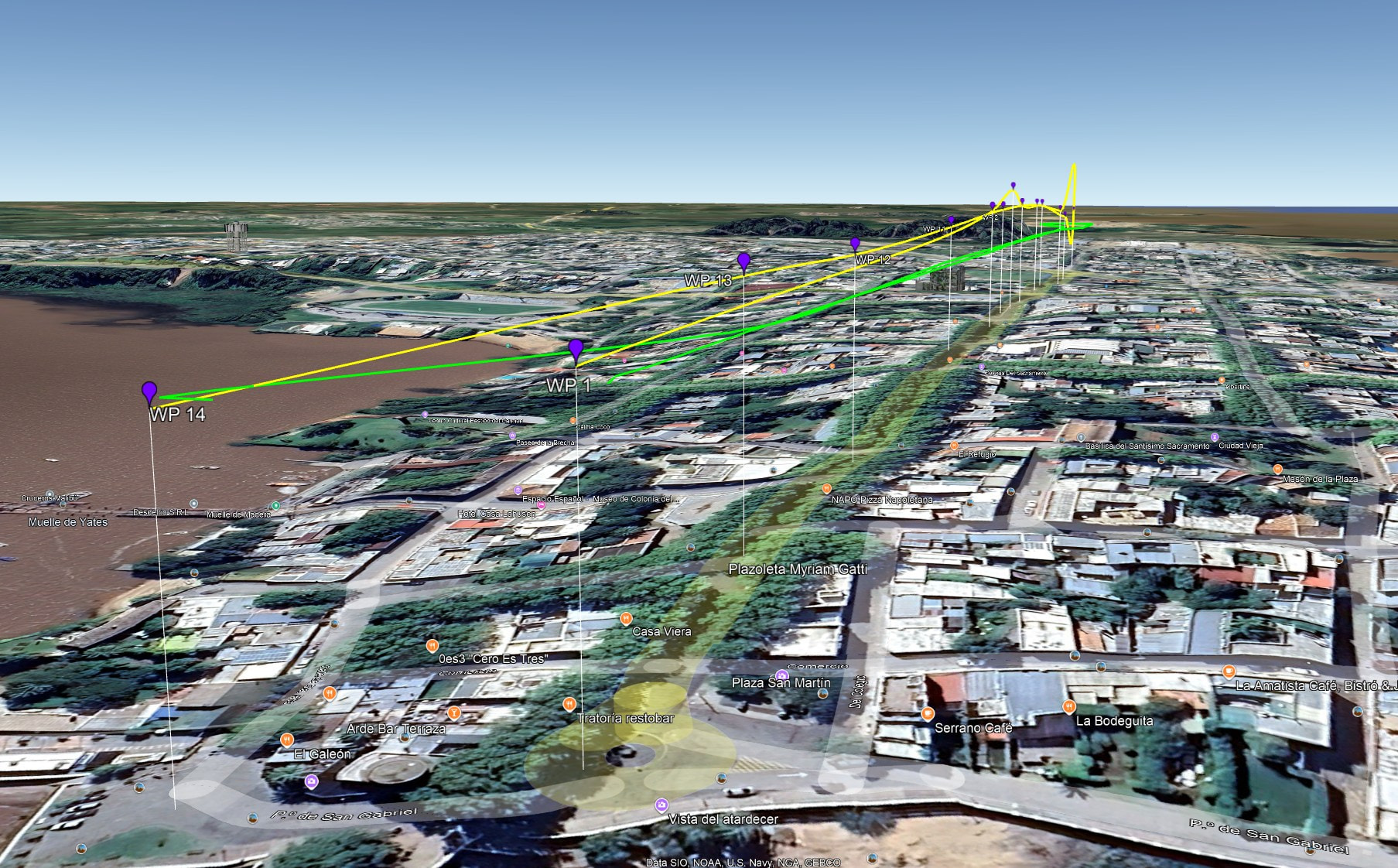
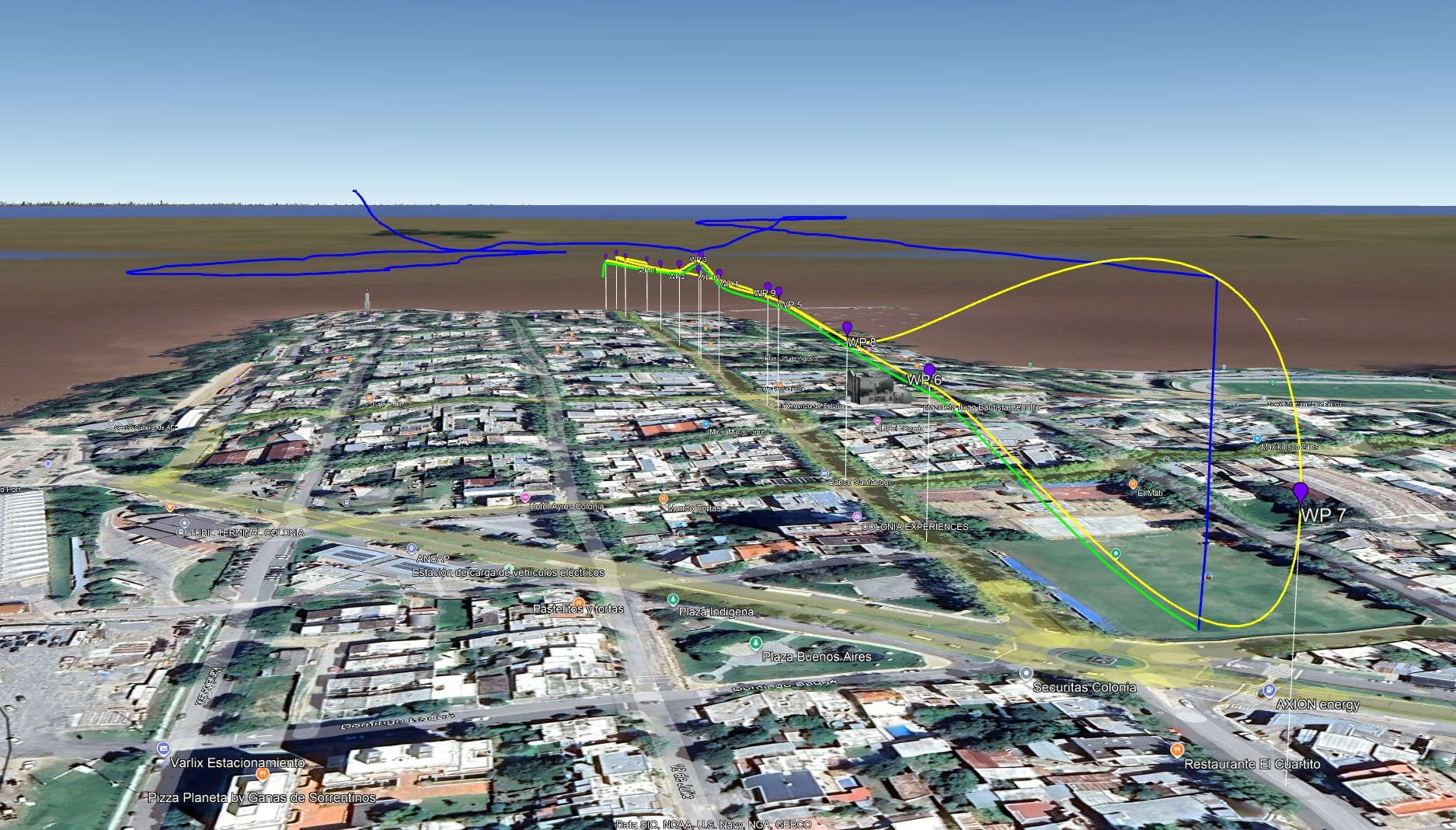
Notice the Litchi mission (yellow) shows one waypoint (#3) higher than the others. Notice the actual flight (green) is flown at a constant height of 50m. This is confirmed in the flight data and your video. This suggests that the first waypoint section came from a mission where the height was set to “Above take-off” and the heights of all waypoints was set to 50m.
The second waypoint section in this flight data (green) closely matches that of the Litchi mission (yellow) you shared. Waypoint mode was exited when the drone reached its lowest point at which time you flew in P-GPS (bypass mode) (blue) straight up and then back towards the home point.
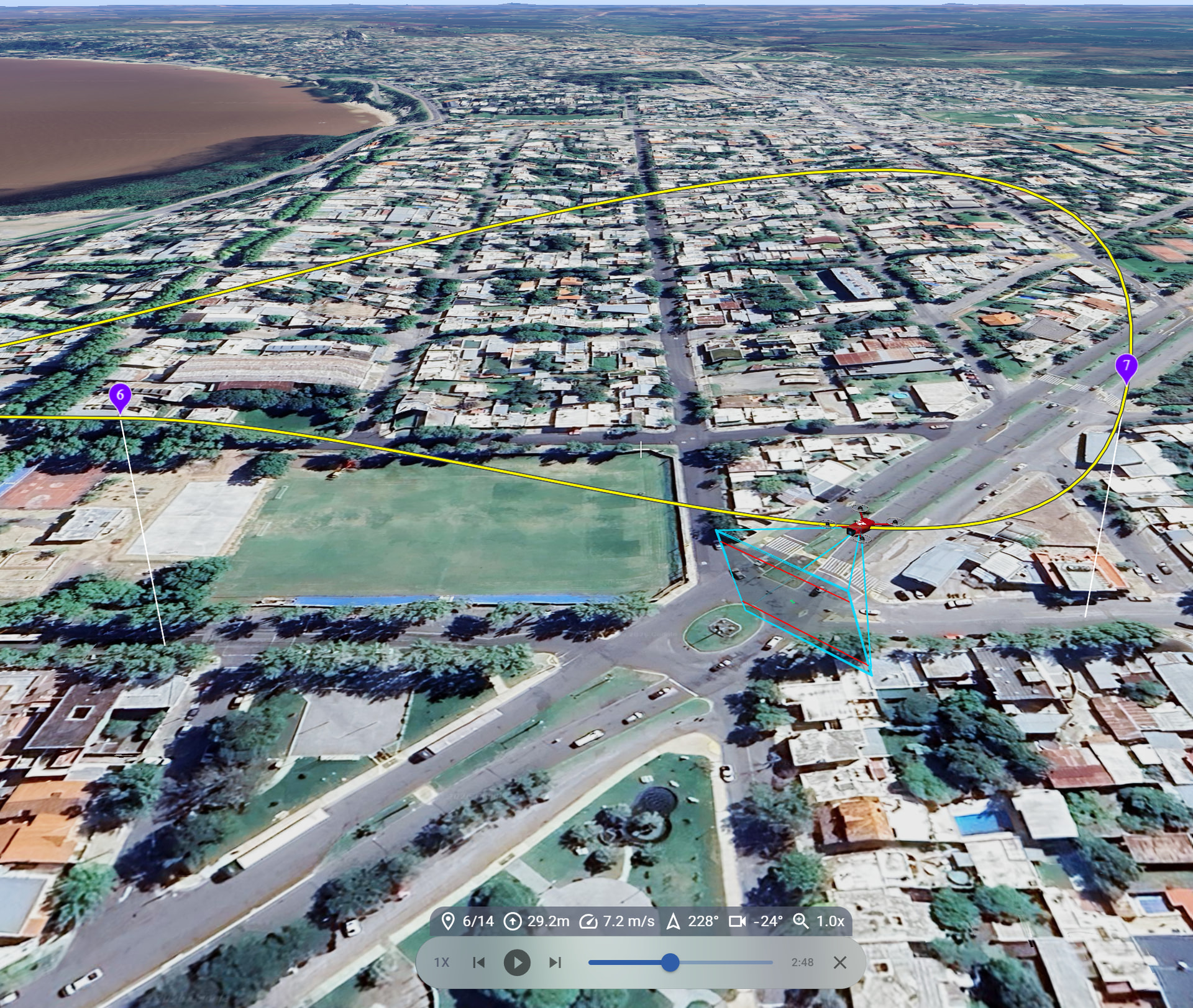
This flight path matches your Litchi mission and confirms the problem near waypoint 7 where the path must travel lower (and then higher) than waypoint 7 in order to create a smooth turn at that waypoint.
My conclusion is that your posts refer to two different flights. The first flight had the “Altitude Mode” set to “Above Take-off” and 50m heights at every waypoint. The second flight has a problematic sequence of waypoints (near #7) that causes the flight path to become too low.
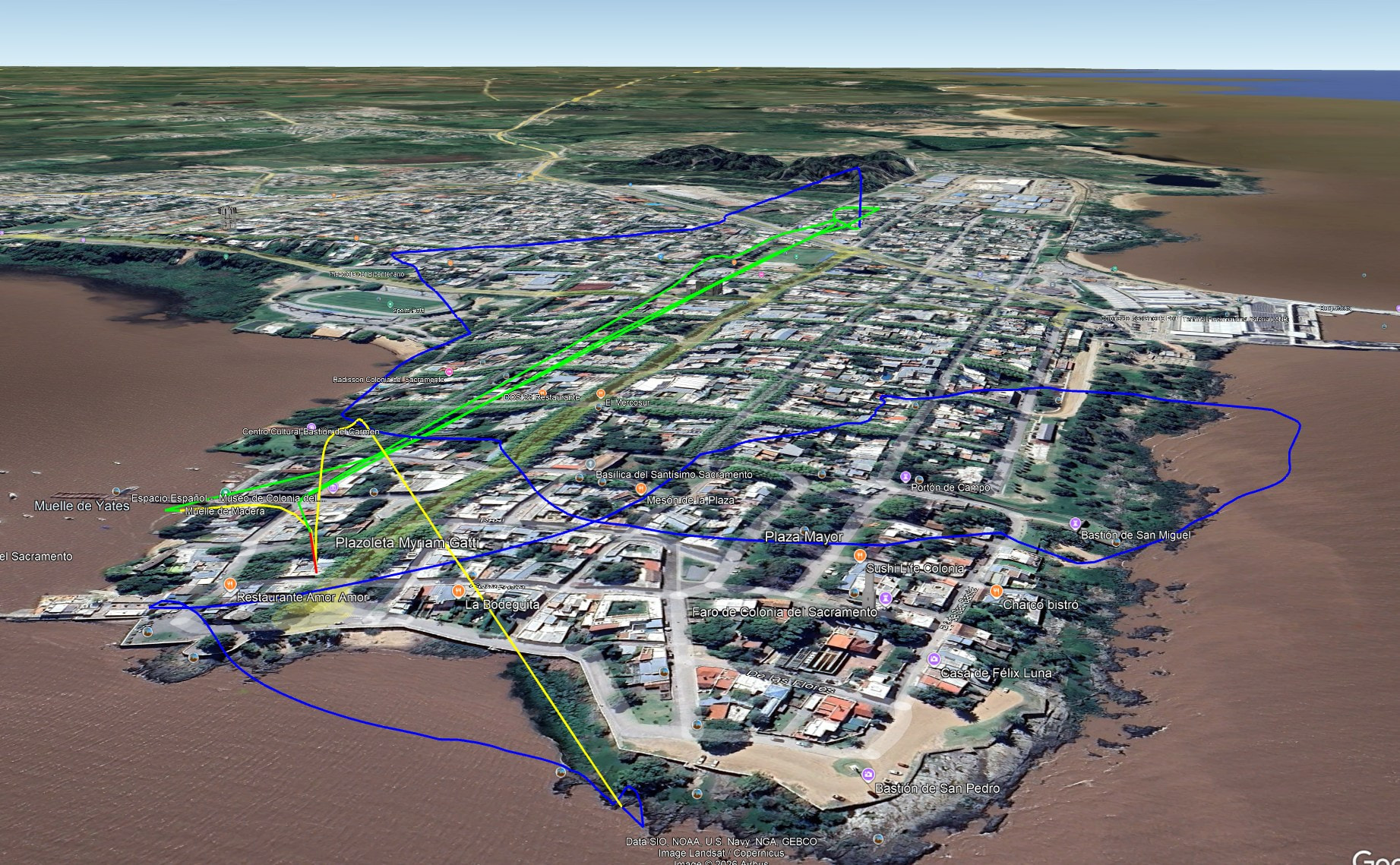
In case you are interested, here is the entirety of your flight in 3D:
I don’t usually use waypoints. I used to do so more often when Litchi had access to the DJI SDK and I used the app directly to plan missions on the previous hub.
It’s unbelievable that DJI hasn’t updated the waypoint mechanism with new features. It’s hard to believe there isn’t an option for straight-line flights. Why do we need those Bezier curves in a photo mission? We have to stupidly add more waypoints to try to minimize the effects of Bezier curves when they aren’t necessary.
Now I’ve learned that I have to use the Earth view to anticipate changes in altitude.
Regarding the constant altitude issue (from HP), I have a screenshot of the hub showing altitudes relative to the ground, not the home point.
It must have been changed at some point. It’s something to check in Fly before flying.
A suggestion for the hub: settings in Litchi Hub, like the language, would be nice if they are saved in the user profile. I constantly have to change the language because it detects my country’s language, and I want it in English.
Thanks again.
P.S.: Do you know of any way to get what I think was called “Follow Me” in DJI Go?
It’s not the current visual tracking, but rather position-based (GPS) tracking. The drone’s path was a follow-along with the control device (I was using an iPad mini). You’d tell it to fly at a certain altitude and a certain distance (x,y), and then, from a moving vehicle, you’d manually control the yaw and gimbal tilt.
You should be able to do straight line flights, we’ve made improvements recently so it’s more reliable. Note that this only works on Android/DJI RCs because DJI Fly for iPhone/iPad forces curves.