What do the “double” triangle lines mean in the camera view?
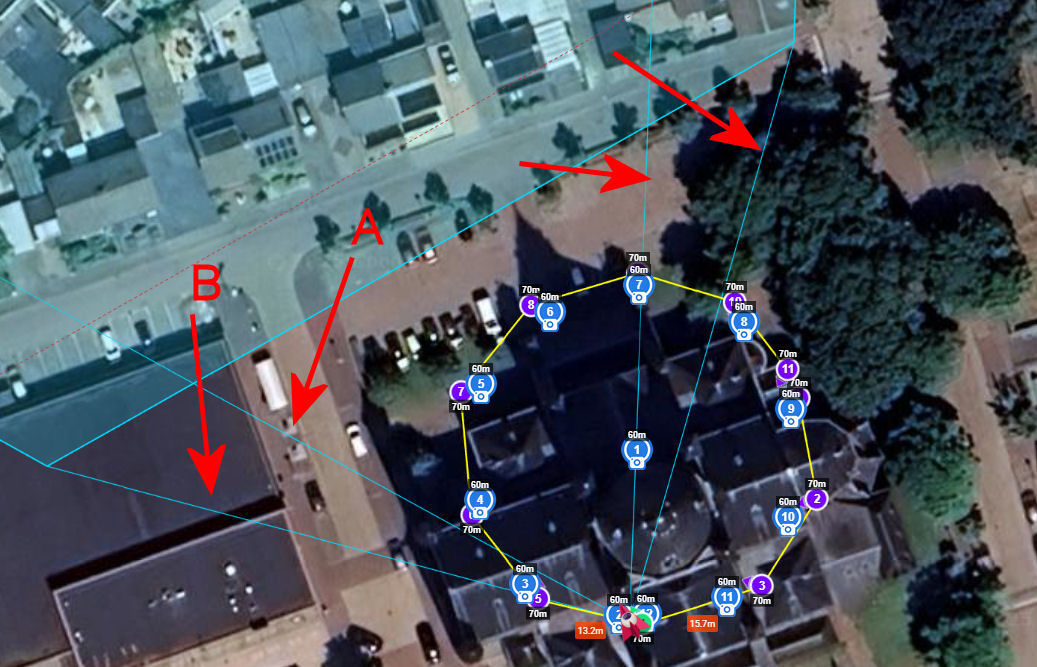
The four lines (two triangles) point to the four corners of the camera’s field of view. To understand this better, temporarily set the “Gimbal Pitch Mode” to “Interpolate” for one of your waypoints. Then, watch the lines as you change the gimbal pitch angle between 0 and -90 degrees. When the camera is pointed straight down (-90), the two triangles (four lines) point to the extent of the camera’s field of view on the ground.
Thank you for your reply.
One more question though.
What is the differenc between the “A“ and “B” lines?
Is the “A” line photo and the “B” line video?
And what about the RED dots?
I’ve already explained that in my first response.
The dashed red lines show the field of view when capturing video. Photos (4x3) and video (16x9) have different aspect ratios.
I wish Litchi would explain things like this when they implement them. Great stuff!
Sometimes one just has to work with the software for a while and these features become obvious. If they don’t, post a question here.
1 Like